
Medoly Last.fm Plugin2.7.0 - Google Play
You'll be able to see results in few seconds.
Publisher Description
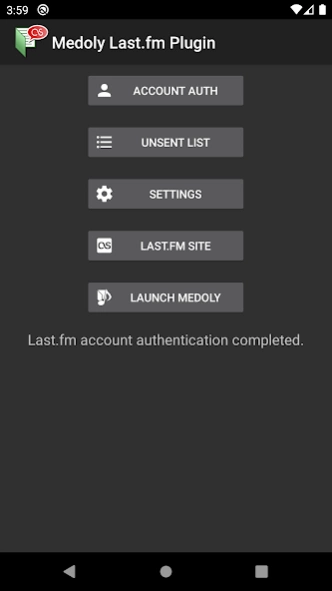
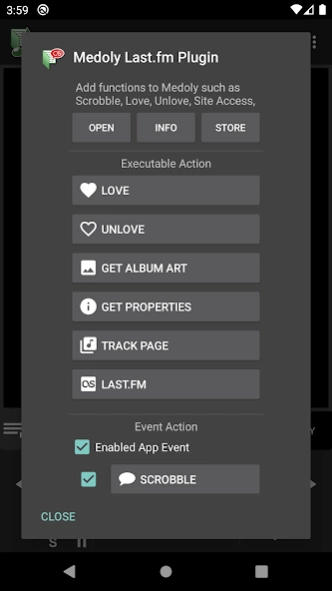
Last.fm Plugin for Medoly.
Medoly Last.fm Pluginis an app to scrobble the playing media information on
Medoly
for
Last.fm ( http://www.last.fm/ )
.
[How to use]
This app needs a Last.fm account .
Medoly can see this app automatically after install .
Authorize your Last.fm account at first .
After that, it starts scrobbling automatically at playing media on Medoly .
After installation, the application icon in the drawer is not displayed. Please launch plugin from home icon at main screen in Medoly.
Automatic startup is restricted and background startup may fail on some devices. In that case, please change to the setting which can start this application in the setting. (Such as ASUS auto-start manager)
[Notes]
- This app scrobble at the time on playing or on start playing. The default is on playing .
- Failure scrobbles are saved in app. You can set maximum count of saving.
- You can send Love / UnLove from Medoly .
- You can set various settings from "Settings" menu .
- Your password is stored in hashed .
[Source]
Bitbucket
[Related Apps]
Medoly
: Media player app for this app.
About Medoly Last.fm Plugin
The company that develops Medoly Last.fm Plugin is wa2c. The latest version released by its developer is 2.7.0.
To install Medoly Last.fm Plugin on your Android device, just click the green Continue To App button above to start the installation process. The app is listed on our website since 2022-02-27 and was downloaded 0 times. We have already checked if the download link is safe, however for your own protection we recommend that you scan the downloaded app with your antivirus. Your antivirus may detect the Medoly Last.fm Plugin as malware as malware if the download link to com.wa2c.android.medoly.plugin.action.lastfm is broken.
How to install Medoly Last.fm Plugin on your Android device:
- Click on the Continue To App button on our website. This will redirect you to Google Play.
- Once the Medoly Last.fm Plugin is shown in the Google Play listing of your Android device, you can start its download and installation. Tap on the Install button located below the search bar and to the right of the app icon.
- A pop-up window with the permissions required by Medoly Last.fm Plugin will be shown. Click on Accept to continue the process.
- Medoly Last.fm Plugin will be downloaded onto your device, displaying a progress. Once the download completes, the installation will start and you'll get a notification after the installation is finished.
Program Details
System requirements
Download information
Pricing
Version History
version 2.7.0
posted on 2022-02-27
2022-02-27 Ver. 2.7.0
* Change API Level to 31
* Change background behaviors
* Update libraries
2021-01-17 Ver. 2.6.1
* Change API Level to 30
* Change the build assembly to AAB from APK
* Modify links
* Update libraries
2020-10-20 Ver. 2.6.0
* Change screen structure
* Change settings screen
Change History
https://github.com/wa2c/medoly-lastfm-plugin/wiki/History
version 2.6.1
posted on 2021-01-17
2021-01-17 Ver. 2.6.1
* Change API Level to 30
* Change the build assembly to AAB from APK
* Modify links
* Update libraries
2020-10-20 Ver. 2.6.0
* Change screen structure
* Change settings screen
2020-05-27 Ver. 2.5.0
* Support oopen screen event on Android 10 or later
* Update Crashlytics library
* Fix some code
Change History
https://github.com/wa2c/medoly-lastfm-plugin/wiki/History
version 2.6.0
posted on 2020-10-19
2020-10-20 Ver. 2.6.0
* Change screen structure
* Change settings screen
2020-05-27 Ver. 2.5.0
* Support oopen screen event on Android 10 or later
* Update Crashlytics library
* Fix some code
2019-11-04 Ver. 2.4.4
* Fix data obtain problem (Not support user scrobbling count)
* Set navigation bar color
* Fix some code
Change History
https://www.wa2c.com/documents/dokuwiki/doku.php?id=en:medoly_last.fm_plugin:history
version 2.5.0
posted on 2020-05-26
2020-05-27 Ver. 2.5.0
* Support oopen screen event on Android 10 or later
* Update Crashlytics library
* Fix some code
2019-11-04 Ver. 2.4.4
* Fix data obtain problem (Not support user scrobbling count)
* Set navigation bar color
* Fix some code
2019-06-25 Ver. 2.4.3
* Fix Android 4.x error.
* Fix preference screen input.
Change History
https://www.wa2c.com/documents/dokuwiki/doku.php?id=en:medoly_last.fm_plugin:history
version 2.4.4
posted on 2019-11-03
2019-11-04 Ver. 2.4.4
* Fix data obtain problem (Not support user scrobbling count)
* Set navigation bar color
* Fix some code
2019-06-25 Ver. 2.4.3
* Fix Android 4.x error.
* Fix preference screen input.
2019-06-21 Ver. 2.4.2
* Fix service bug
* Remove unnecessary info collecting..
2019-06-11 Ver. 2.4.1
* Add privacy policy
Change History
https://www.wa2c.com/documents/dokuwiki/doku.php?id=en:medoly_last.fm_plugin:history
version 2.4.3
posted on 2019-06-24
2019-06-25 Ver. 2.4.3
* Fix Android 4.x error.
* Fix preference screen input.
2019-06-21 Ver. 2.4.2
* Fix service bug
* Remove unnecessary info collecting..
2019-06-11 Ver. 2.4.1
* Add privacy policy
2019-06-10 Ver. 2.4.0
* Use latest libraries (support AndroidX)
* Crashlytics support
* Android P support
* Code adjustment
Change History
https://www.wa2c.com/documents/dokuwiki/doku.php?id=en:medoly_last.fm_plugin:history
version 2.1.0
posted on 2018-01-16
2018-01-17 Ver. 2.1.0
- Changed codes to Kotlin
- Changed targetSdkVersion to 26
- Changed some check functions
- Fixed some bugs
2017-11-04 Ver. 2.0.7
- Adjusted dialogs
- Fixed some error messages
2017-10-25 Ver. 2.0.6
- Modified a posting problem
2017-10-24 Ver. 2.0.5
- Improved album art downloading
- Changed app calling method
2017-09--12 Ver. 2.0.1
- Changed message display conditions.
version 1.5.0
posted on 2016-09-25
2016-09-25 Ver. 1.5.0 (Medoly ver. 2.8.0 or later required),- Changed the plugin data structure.,[2016-04-24] Ver. 1.2.0,- Added the tack page menu .,- Modifiled some processings .,[2015-11-11] Ver. 1.1.5,- Supported to save unsent scrobbler.,- Added some messages.,- Fixed some problems.,[2015-09-12] Ver. 1.1.0,- Hide the drawer icon,- Fixed the problem to can't select menu when media is unselected.,- Fixed the problem to post null.
Disclaimer
Official Google Play Link
We do not host Medoly Last.fm Plugin on our servers. We did not scan it for viruses, adware, spyware or other type of malware. This app is hosted by Google and passed their terms and conditions to be listed there. We recommend caution when installing it.
The Google Play link for Medoly Last.fm Plugin is provided to you by apps112.com without any warranties, representations or guarantees of any kind, so access it at your own risk.
If you have questions regarding this particular app contact the publisher directly. For questions about the functionalities of apps112.com contact us.
